

Der Tab Analytics bietet einen Überblick auf einem Screen über die Aktivität im gewählten Zeitraum, mit nach Dimensionen aufgeschlüsselten Kennzahlen.
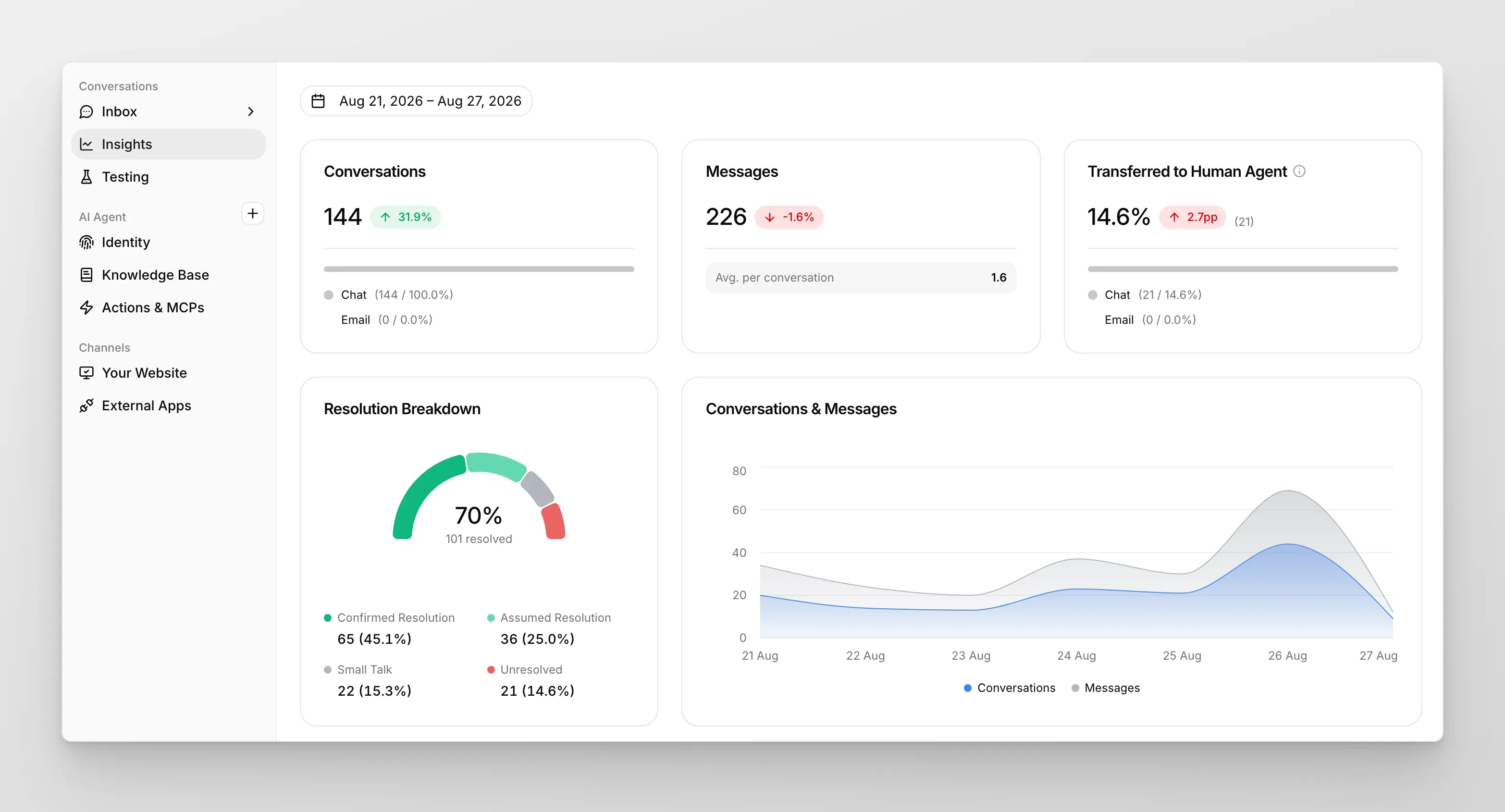
Der Tab Analytics bietet Ihnen einen Überblick auf einem Screen über die Aktivität im Zeitraum, den Sie oben auf der Seite auswählen. Die Karten am oberen Rand zeigen die wichtigsten Kennzahlen; alles darunter schlüsselt sie nach Dimension auf.
Obere Karten
Abschnitt betitelt „Obere Karten“Jede Karte zeigt eine große Zahl für den Zeitraum sowie ein Delta gegenüber dem vorherigen vergleichbaren Zeitraum (z. B. -20.5% gegenüber der Vorwoche).
- Conversations — Gesamtzahl der von Ihrem KI-Agenten bearbeiteten Konversationen. Darunter aufgeteilt nach Quellkanal (Chat vs. Email).
- Messages — Gesamtzahl der ausgetauschten Nachrichten (Besucher + KI), mit Avg. per conversation als Untertitel.
- Transferred to Human Agent — Prozentsatz der eskalierten Konversationen, mit einem Prozentpunkt-Delta (z. B.
+0.1pp). Aufgeteilt nach Kanal.
Resolution Breakdown
Abschnitt betitelt „Resolution Breakdown“Ein Donut-Diagramm, das den Anteil der Konversationen in jedem der vier Resolution-Buckets zeigt:
- Confirmed Resolution — der Besucher hat ausdrücklich angegeben, dass die Konversation gelöst wurde.
- Assumed Resolution — keine ausdrückliche Bestätigung, aber die KI hat geschlossen, dass die Konversation die Anfrage des Besuchers wahrscheinlich gelöst hat.
- Small Talk — Geplauder oder nicht substanzielle Konversationen.
- Unresolved — die Frage des Besuchers wurde nicht zufriedenstellend beantwortet.
Der kombinierte Anteil aus Confirmed + Assumed ist Ihre Gesamt-Resolution-Rate.
Conversations & Messages
Abschnitt betitelt „Conversations & Messages“Ein Zeitreihendiagramm der gesamten Conversations und der gesamten Messages pro Tag über den gewählten Zeitraum. Nutzen Sie es, um Volumenspitzen, Effekte von Deployments oder Einbrüche am Wochenende zu erkennen.
Conversations per week day / per hour
Abschnitt betitelt „Conversations per week day / per hour“Zwei Verteilungsdiagramme (Radar + Balken), die zeigen, wann Ihre Besucher chatten: an welchen Wochentagen und zu welchen Tagesstunden die meiste Aktivität herrscht. Nützlich für Personalentscheidungen, wenn Sie menschliche Agenten haben, die ungelöste Konversationen übernehmen.
Your users talk via / talk in
Abschnitt betitelt „Your users talk via / talk in“Zwei Verteilungsdiagramme, die Konversationen nach Kanal (Widget, Embed, WhatsApp, Slack, Discord usw.) und nach Sprache (Englisch, Polnisch, Spanisch, …) aufschlüsseln. Das Sprachdiagramm wird automatisch aus der Konversation erkannt — keine Einrichtung erforderlich.