

L’onglet Analytics offre une vue d’ensemble sur un seul écran de l’activité pour la période sélectionnée, avec des indicateurs clés répartis par dimension.
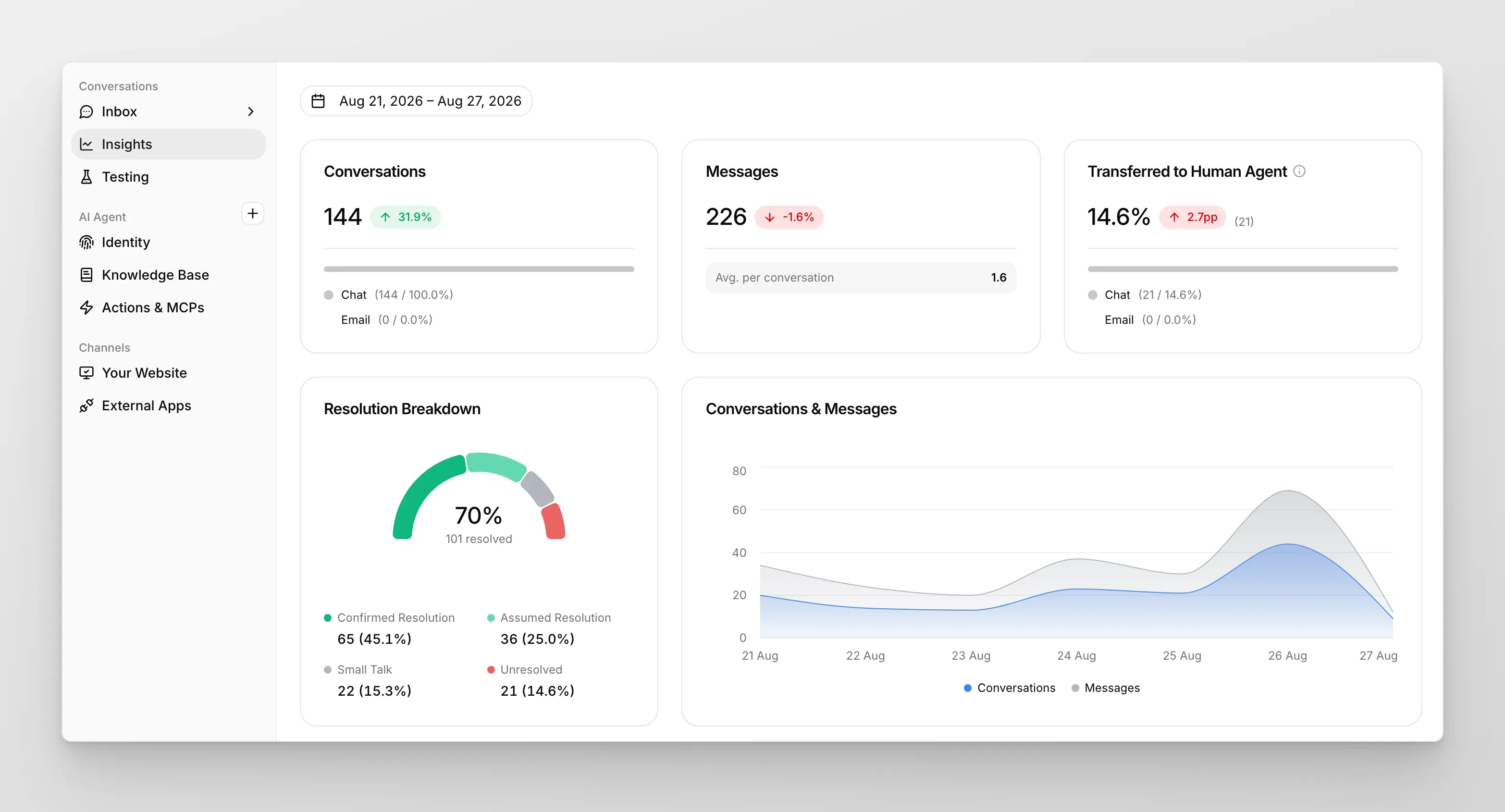
L’onglet Analytics vous offre une vue d’ensemble sur un seul écran de l’activité pour la période que vous choisissez en haut de la page. Les cartes du haut affichent les indicateurs clés ; tout ce qui se trouve en dessous les décompose par dimension.
Cartes du haut
Section intitulée « Cartes du haut »Chaque carte affiche un grand chiffre pour la période, ainsi qu’une variation par rapport à la période comparable précédente (par exemple -20.5% vs la semaine précédente).
- Conversations : total des conversations traitées par votre Agent IA. Décomposé en dessous par canal source (Chat vs Email).
- Messages : total des messages échangés (visiteur + IA), avec Avg. per conversation en sous-titre.
- Transferred to Human Agent : pourcentage des conversations qui ont été escaladées, avec une variation en points de pourcentage (par exemple
+0.1pp). Décomposé par canal.
Resolution Breakdown
Section intitulée « Resolution Breakdown »Un graphique en anneau (doughnut) montrant la part des conversations dans chacune des quatre catégories de résolution :
- Confirmed Resolution : le visiteur a explicitement indiqué que la conversation était résolue.
- Assumed Resolution : aucune confirmation explicite, mais l’IA a conclu que la conversation avait probablement résolu la demande du visiteur.
- Small Talk : conversations de bavardage ou sans substance.
- Unresolved : la question du visiteur n’a pas reçu de réponse satisfaisante.
La part combinée Confirmed + Assumed correspond à votre taux de résolution global.
Conversations & Messages
Section intitulée « Conversations & Messages »Un graphique de série temporelle du total des Conversations et du total des Messages par jour sur la période sélectionnée. Utilisez-le pour repérer les pics de volume, les effets d’un déploiement ou les baisses du week-end.
Conversations per week day / per hour
Section intitulée « Conversations per week day / per hour »Deux graphiques de distribution (radar + barres) qui montrent quand vos visiteurs discutent : quels jours de la semaine et quelles heures de la journée connaissent le plus d’activité. Utile pour les décisions de staffing si des agents humains prennent en charge les conversations non résolues.
Your users talk via / talk in
Section intitulée « Your users talk via / talk in »Deux graphiques de distribution décomposant les conversations par canal (Widget, Embed, WhatsApp, Slack, Discord, etc.) et par langue (anglais, polonais, espagnol, …). Le graphique des langues est détecté automatiquement à partir de la conversation, aucune configuration n’est requise.