

Open Conversations → Insights → AI Insights to review individual conversations. Use the Market Insights, Alerts, Flagged, and All filters to choose which conversations to show. Configure alert rules under Manage Alerts.
The aggregate charts for conversation outcome, sentiment, topics, link tracking, Time to First Response, and CSAT are under Conversations → Insights → Advanced. The sections below explain those related metrics and where to find them.
Conversation Outcome
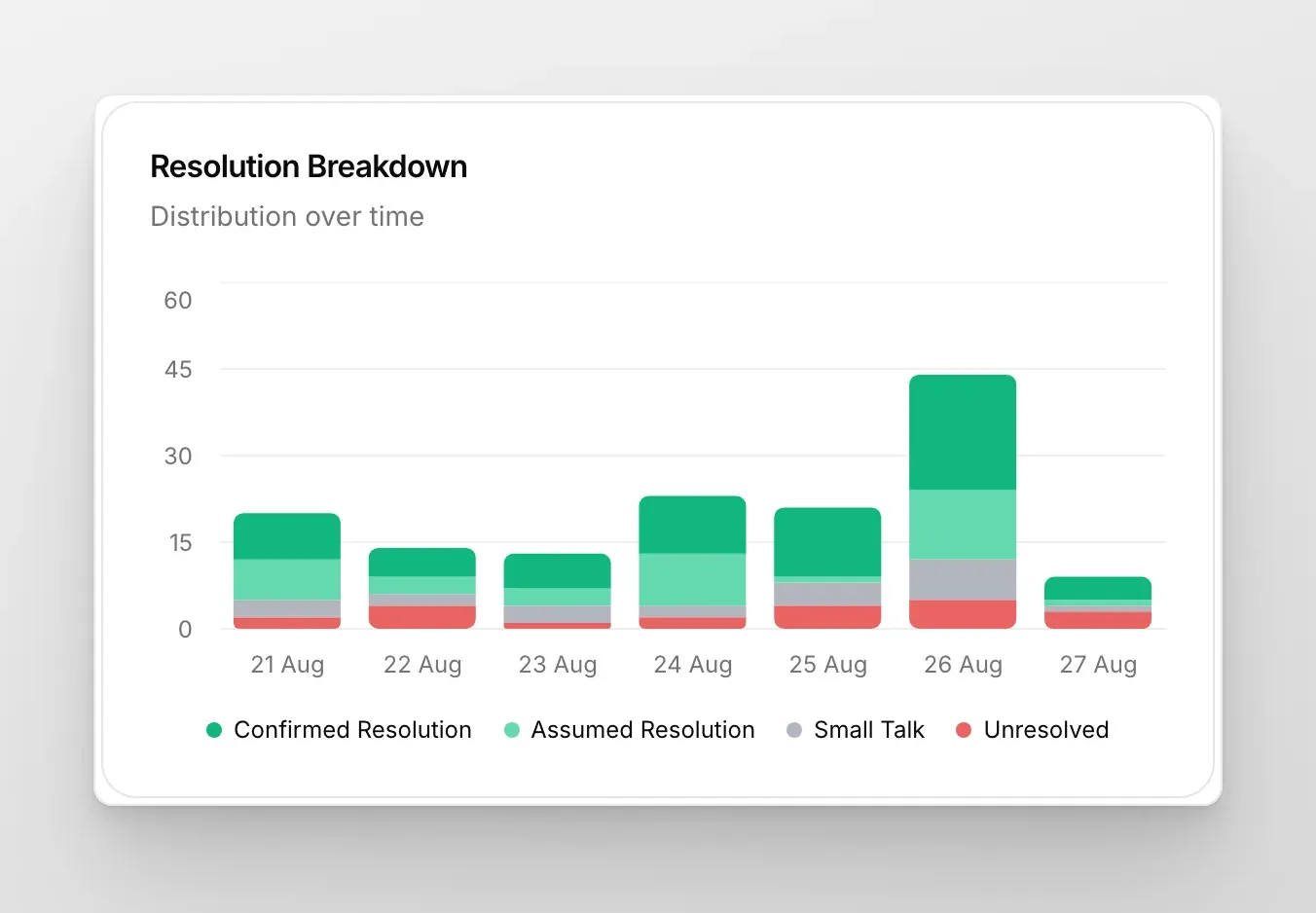
Section titled “Conversation Outcome”See how many conversations end Resolved vs Unresolved over the period in Advanced. Outcome is also visible inside each conversation in the Inbox details pane. No setup is required on supported plans.
Why it helps
- Quickly spot unresolved spikes that may need human follow-up.
- Track whether changes to your AI or content improve resolution rates.
Sentiment Analysis
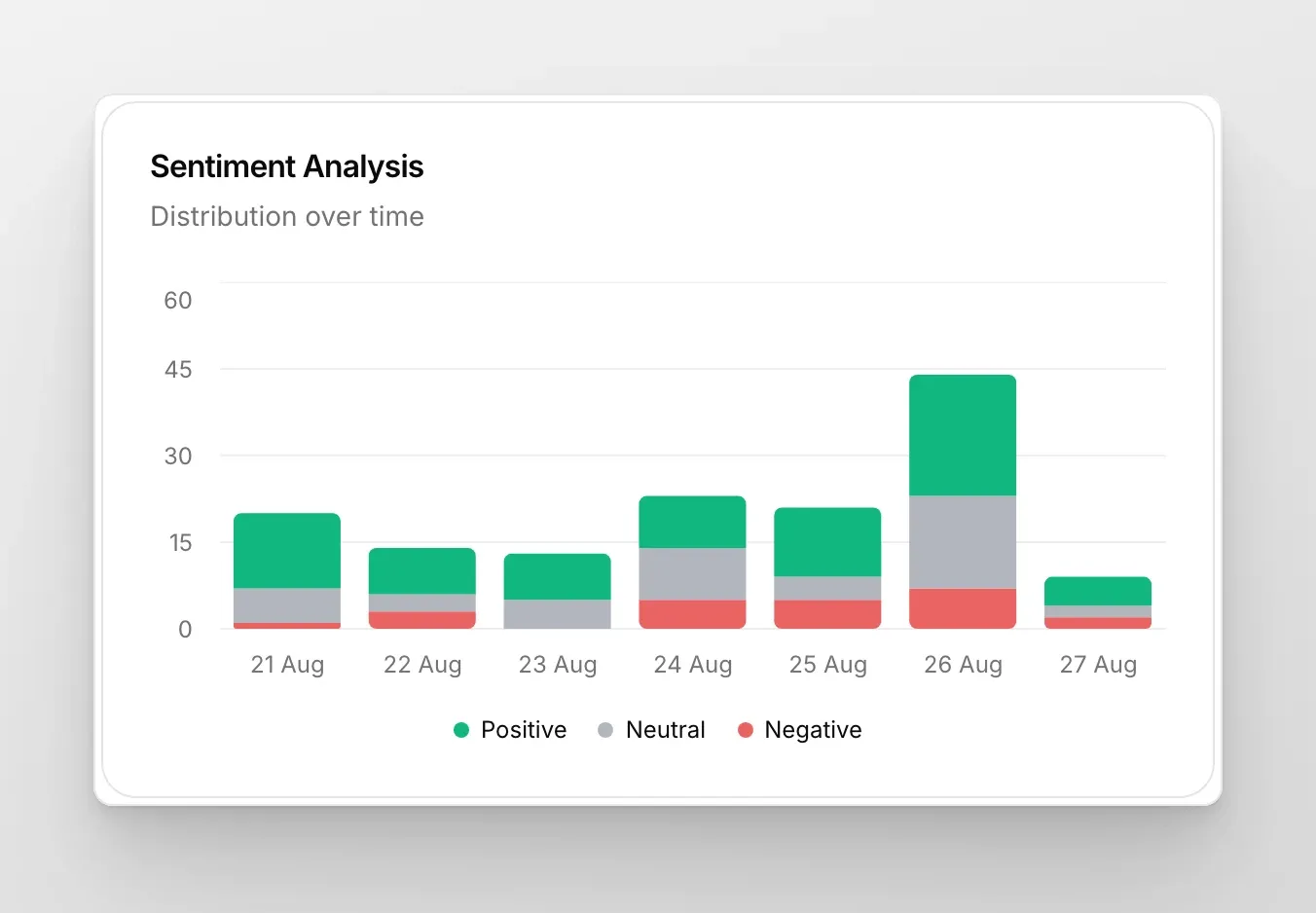
Section titled “Sentiment Analysis”Understand how users felt after chatting with your AI: Positive, Neutral, or Negative. Aggregated under Advanced, and also per-conversation in the Inbox details pane. On by default.
Conversation Topics
Section titled “Conversation Topics”Listening to your users is key, but doing it at scale is hard. Topics help you track, analyze, and act on the main subjects discussed in your chats without getting lost in the details. The distribution over time is also visible in the Advanced tab.
Time to First Response
Section titled “Time to First Response”Find this chart under Insights → Advanced. It shows how long a visitor waited for a human to reply after a conversation was handed off. The clock starts at the confirmed handoff and stops on the first message sent by a human operator.
This is a measure of your team’s responsiveness, not the AI’s. It says nothing about how fast the AI Agent answers — the AI replies in seconds and is never counted here. Conversations the AI handles on its own never produce a Time to First Response at all.
The section stays empty until you have had handoff conversations in the selected range that a human actually replied to. A handoff nobody answered contributes nothing, so a suspiciously good number is worth checking against your handoff volume.
CSAT Ratings
Section titled “CSAT Ratings”Find these ratings under Insights → Advanced. They measure customer satisfaction after handoffs and stay empty until you have had handoff conversations with rating prompts in the chosen range.
For satisfaction with the AI itself rather than with your team, use Conversation Rating, which prompts every visitor rather than only handed-off ones.
Per-row badge
Section titled “Per-row badge”Each row in the AI Insights list carries a small badge. By default it shows the conversation’s Topic, but you can change what every badge displays — Sentiment, Intent, Resolution, Language, Channel, or any value from your conversation metadata — from the Conversation badge setting in the Inbox. The same badge appears on the Inbox conversation list, so both surfaces stay consistent.